


Hydrawise
4.6673.00 Reviews
App Specs
- Version
- 0.1.1162
- Updated On
- License
- Free
- Downloads
- 100,000+
- Developer
- Hunter Industries
- Categories
- House & Home
- Platform
- Android
Screenshots
 Analysis by AppCompare
I’ve found that irrigation apps are most useful when they help me answer a practical question: is watering already handled, or do I need to step in? Hydrawise is built for that job, connecting a phone with a compatible irrigation controller so garden watering can be managed without repeatedly checking the yard. It makes the most sense for someone who already has, or plans to use, Hunter Industries equipment; it is not a stand-alone way to water plants.
Where setup can get stuck
The first hurdle is less about the screen than the equipment behind it. You need a compatible controller and a working connection between it and the app. If you are still choosing a system, check that the controller suits your irrigation layout before treating the app as the deciding factor. A phone app cannot fix a controller that is incompatible, incorrectly wired, or unable to reach the network.
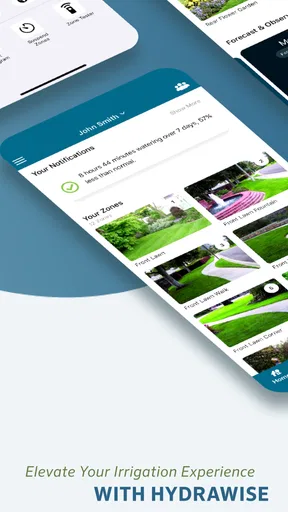
Once the account and controller are in place, the main job is making the digital setup match the garden. Zones should correspond to the real areas being watered, not just convenient labels. If one zone covers sunny containers and another covers shaded beds, a single shared schedule may not reflect their different needs. I’d take a few minutes to label areas clearly and check which valve serves each one before relying on automation.
Setup checks that save time later
Before changing schedules, I would confirm that the controller appears in the app and that each listed zone has a sensible name. Then compare the schedule with the physical system: which areas are connected, and which plants actually receive water from each zone? This small audit can prevent a common kind of confusion, where the app appears to run a schedule correctly but the garden layout was mapped inaccurately from the start.
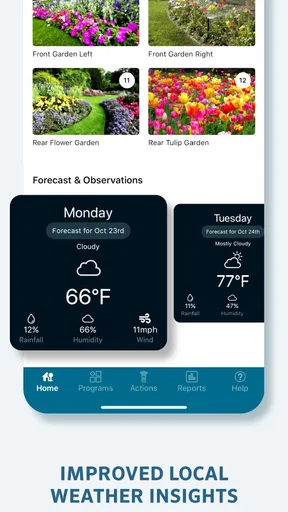
It also helps to treat weather-based scheduling as a useful input rather than a promise that every plant’s needs are understood. Local conditions can vary across a yard: a bed under a roof edge may stay dry while an open lawn receives rain. I’d use the app’s schedule as a starting point and keep an eye on the plants, especially after changing a zone or planting something with different water needs.
Recovering from a confusing workflow
If something seems off, I would avoid making several schedule changes at once. First check whether the controller is visible and whether the relevant zone is the one you meant to adjust. Then review the schedule and any status or notification information available in the app. Changing one thing at a time makes it easier to tell whether the problem was a mistaken setting or something outside the phone.
A practical example: imagine leaving for a weekend and realizing that a heat-sensitive flower bed and a drought-tolerant border share a schedule. Rather than rebuilding every program in a rush, identify the zones, confirm which physical areas they serve, and adjust only the schedule that needs attention. That measured approach is less likely to leave another part of the yard with an unintended change.
Worth Reading Before You Choose

EA SPORTS FC Mobile 26 Is a Bigger Football Game, but It Takes Time

Flipboard Shows What News Apps Must Do Beyond the Feed

Switching to Android Auto Means Rethinking Your Driving Routine

Google Calendar Makes a Crowded Week Easier to Manage

Ludo King Makes the Most of the Minutes Between Plans

Baby Panda World Brings Quick Play to Modern Phones, but Its Game Library Feels Busy
When the app is not the cause
A missed watering event does not automatically mean the app has failed. The controller, its connection, the water supply, valves, or the irrigation lines can all affect what happens outdoors. I would check whether the controller is powered and connected, then look for an obvious issue with the water source or the affected zone. If the app shows the intended schedule but the ground remains dry, the next useful step may be inspecting the irrigation hardware rather than repeatedly tapping through menus.
This distinction matters because Hydrawise is a control and management tool, not a repair service for a blocked line or a malfunctioning valve. If only one area is affected, that points toward checking that zone’s equipment and layout. If the whole system is unresponsive, checking the controller and its connection is a more sensible first move. For a persistent hardware fault, help from someone familiar with the irrigation installation may be more useful than further app troubleshooting.
Using Hydrawise in the garden
The app is free, and Hunter Industries develops it for home irrigation management. Its current version is 0.1.1162, it requires Android 8.0 or later, and its content rating is Teen. It has a 4.6 average from around 9,700 ratings, with more than 100,000 installs. Those figures suggest that many people have tried it, but the more important question is whether its controller-based approach fits your yard.
Making schedules fit real plants
The strongest reason to organize watering by zone is that gardens are rarely uniform. Lawns, vegetable beds, pots, and established shrubs can have different needs, and grouping them thoughtfully gives a schedule a better chance of matching the landscape. A useful, slightly less obvious habit is to revisit zone names whenever the garden changes. New containers or a rearranged bed can make old labels misleading, and clear names reduce the risk of adjusting the wrong area when you are in a hurry.
Weather-aware scheduling can also be valuable when your routine changes. If you are away for a few days, the app gives you a way to review irrigation without walking around the property. But I would not use a weather adjustment as a reason to stop checking plants altogether. Rainfall at a nearby reporting point may not reflect a sheltered corner of your yard, so a quick visual check remains worthwhile when conditions are unusual.
Who benefits, and who should look elsewhere
I’d recommend Hydrawise to homeowners with a compatible Hunter controller who want to manage several irrigation areas from a phone, especially if they care about keeping schedules organized while away. It is also a good fit for someone who enjoys adjusting a system to the layout of a garden rather than setting one timer for everything. The value comes from pairing app controls with installed irrigation equipment, not from the app alone.
If you water a few pots by hand, have no compatible controller, or want the simplest possible one-button timer, this may be more system than you need. A basic hose timer or manual routine can be easier and less costly to maintain when the garden is small. Likewise, someone who does not want to manage accounts, connectivity, zone labels, or schedules may prefer a straightforward irrigation setup with fewer connected parts.
How it differs from ordinary timers
A conventional timer is often easier to understand: set a time, let it run, and make changes at the device. Hydrawise’s appeal is the phone-based view and the ability to organize watering around multiple zones and weather information. That flexibility brings a trade-off. More context and remote control can be helpful, but they also mean you need to keep the controller connection and the app’s representation of the garden in order.
Compared with simply watering by hand, the app can reduce repetitive trips to the controller and make a regular routine easier to maintain. It cannot judge every plant’s condition as well as a person standing beside it. My preferred approach would be to use scheduled control for consistency, then make occasional adjustments based on what the soil and plants are telling me. That balance is more reliable than assuming automation always knows best.
Small habits that make the system easier to trust
I would set up one zone at a time and verify its name against the actual area before adding complexity. After any meaningful change to the garden or irrigation hardware, review the affected zone rather than assuming the old schedule still fits. If you are troubleshooting, note what you changed and when; a simple record helps separate a schedule adjustment from a connectivity or equipment problem.
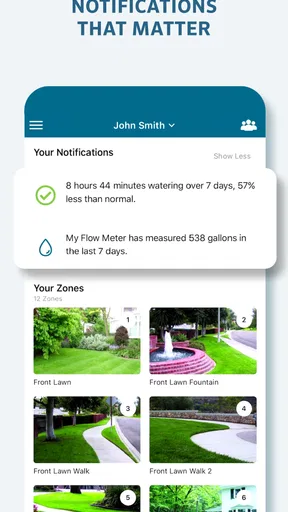
Notifications are useful as prompts, but I would treat them as information to check rather than proof that water reached every plant. A controller can report its activity while a physical issue still prevents proper coverage. When a particular bed looks stressed, inspect the emitter or sprinkler coverage in that area and compare it with the app’s zone assignment. This keeps the diagnosis grounded in both the digital schedule and the real garden.
Practical verdict
In everyday use, the best scenario is a homeowner who has several established watering areas, has mapped them carefully, and wants a convenient way to keep an eye on the routine while away. For example, before a short trip I would check that the zones are named clearly, review the active schedule, and make sure the controller is reachable. That is a more useful preparation than making last-minute changes to every setting without knowing what each zone controls.
My overall view is positive but specific: Hydrawise can make an existing compatible irrigation system easier to manage, particularly when zone-level control and weather-aware scheduling matter. The main friction is that setup quality depends on the controller, network, and accuracy of the garden layout represented in the app. If those pieces are in place, it is a practical tool; if you only need occasional watering for a small space, a simpler timer is probably the better choice.
Picture this: you’re lounging on your couch, sipping your favorite drink, and it suddenly hits you—did you forget to water the garden? Enter Hydrawise, your trusty sidekick in smart irrigation, ensuring your plants stay lush and green without you lifting a finger. I’ve recently had the pleasure of diving into this app, and let me tell you, it’s a game changer for anyone with a garden or yard.
Getting Started with Hydrawise
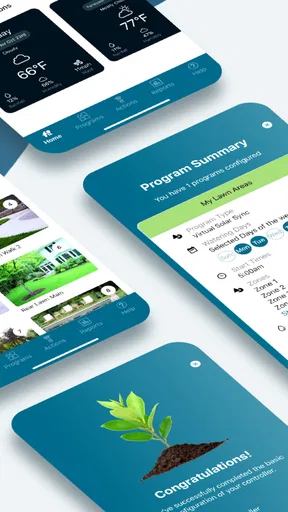
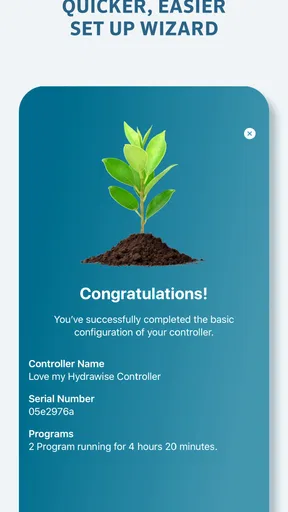
First things first, setting up Hydrawise is a breeze. Once you’ve downloaded it from the App Store or Google Play, you’re greeted with a clean and intuitive interface. After creating an account, it’s time to connect your smart controller. The app guides you through each step, making the process as smooth as butter. You’ll feel like a tech wizard in no time.
Features That Make Your Life Easier
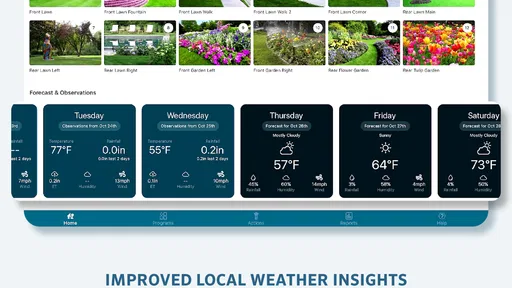
This app is packed with features that cater to both the tech-savvy and the not-so-tech-savvy among us. The smart scheduling is a standout feature, allowing you to set up watering schedules based on weather forecasts. It pulls in local weather data to adjust watering times, ensuring you’re not watering your plants during a downpour. Talk about efficient!
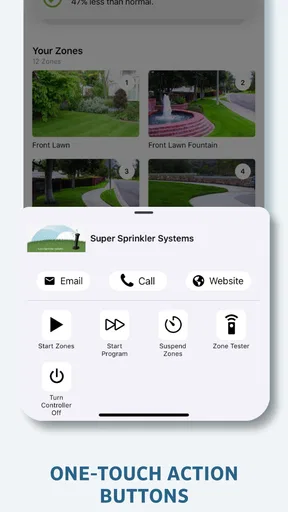
Another nifty feature is the zone setup. You can customize watering for different areas of your garden, ensuring that your thirsty tomatoes don’t get the same treatment as your cacti. The app even provides you with water usage reports, so you can be both eco-friendly and budget-conscious.
The User Experience
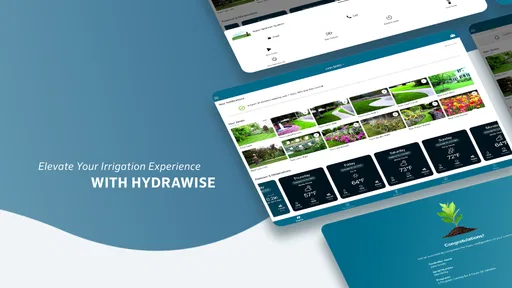
What really makes Hydrawise shine is its user-friendly design. Navigating through the app is a piece of cake. Everything is where you’d expect it to be, with no unnecessary clutter. You can easily switch between different zones and schedules, and the notification system keeps you updated on your watering status. It’s like having a personal garden assistant in your pocket.
Additionally, the app offers excellent customer support. If you ever run into a snag, their helpful team is just a message away. I’ve reached out a couple of times with questions, and they were quick to respond with solutions.
What’s the Catch?
While Hydrawise is a fantastic app, it’s not without a couple of quirks. Some users might find the initial setup a bit tricky, especially if they’re not familiar with smart devices. However, the app does provide a lot of guidance, so most people should be able to figure it out with a little patience.
Another thing to consider is the cost. While the app itself is free, some of the advanced features require a subscription. If you’re serious about your garden, it’s definitely worth the investment, but it’s something to keep in mind when budgeting.
Final Thoughts
In a world where time is precious and convenience is king, Hydrawise offers a brilliant solution for garden maintenance. It’s a smart, efficient, and user-friendly app that takes the guesswork out of irrigation. Whether you’re a seasoned gardener or just someone who loves a green space, this app is definitely worth checking out.
So, if you’re ready to take your garden to the next level with minimal effort, give Hydrawise a try. It’s a small step with a big impact, ensuring your garden is always in its prime. Happy gardening!
Pros
- User-friendly interface for easy navigation.
- Real-time weather updates for precise watering.
- Customizable schedules for different zones.
- Remote access from any location.
- Water usage reports for efficiency tracking.
Cons
- Limited features in free version.
- Requires stable internet connection.
- Initial setup can be time-consuming.
- Some advanced features need subscription.
- Compatibility issues with older devices.
FAQs for Hydrawise
What is Hydrawise and how does it work?
Hydrawise is a smart irrigation control app designed to manage your watering system efficiently. It connects with your existing irrigation setup and uses weather forecasts, soil moisture levels, and plant type information to optimize watering schedules. This ensures your garden gets the right amount of water, reducing waste and promoting healthy plant growth.
Is Hydrawise compatible with all irrigation systems?
Hydrawise is compatible with most irrigation systems, but it's always best to check the compatibility list provided by the developers. The app is designed to work particularly well with Hunter controllers, but it can integrate with other systems through a Wi-Fi connection, allowing for versatile usage across different setups.
How does Hydrawise help save water?
Hydrawise saves water by using smart weather-based adjustments and soil moisture data to tailor watering schedules. It prevents overwatering by adjusting based on real-time weather forecasts and historical climate data. This intelligent approach ensures your plants receive just the right amount of water, conserving resources and reducing your water bill.
Can I control Hydrawise remotely?
Yes, Hydrawise offers remote access through its mobile app, allowing you to manage your irrigation system from anywhere. Whether you're at work or on vacation, you can adjust watering schedules, monitor system performance, and receive alerts about potential issues directly on your smartphone, ensuring complete control and peace of mind.
Does Hydrawise offer any integration with smart home systems?
Hydrawise integrates with various smart home systems, including Amazon Alexa and Google Assistant. This allows you to use voice commands to control your irrigation system, enhancing convenience and ease of use. Integration with these platforms ensures that Hydrawise fits seamlessly into your existing smart home ecosystem.


